
Smart Taskbar 1 (V1)1.2.18 - Get APK
You'll be able to download in few seconds.
Publisher Description
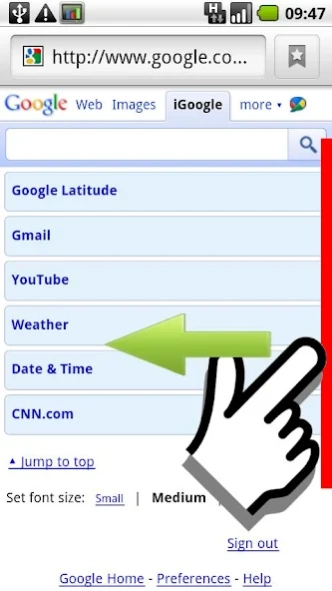
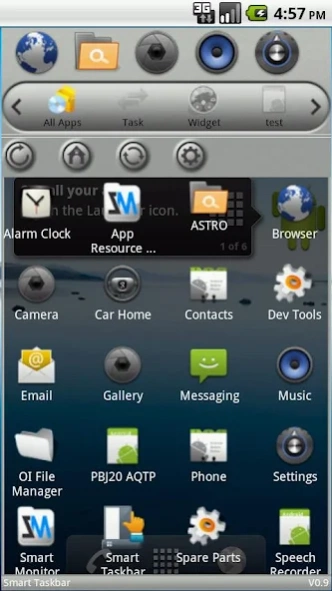
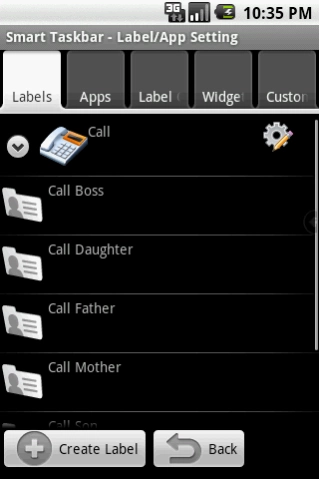
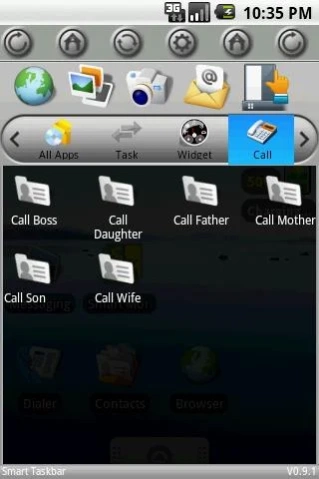
One click access to any app. Perfect multitasking experience.
☆☆☆ Smart Taskbar V2 is released in Google Playstore too! Search Smart Taskbar 2 to get yours. ☆☆☆
Launch any application instantly. Swipe your finger or click icon anytime in any App to bring up a mini sidebar for super fast app launching also works as app organizer, folder organizer, multi tasker, task killer, and shortcut manager.
If you want to use your phone one handed with complete touch experience, you find Android system takes too many steps to complete one simple job, or you need a faster way to get things organized, get Smart Taskbar to make your life easier.
Smart Taskbar is the first and origin of all similar app in this class. It is the most customizable and more complete in features. In addition, compare to others, Smart Taskbar requires way less steps, finger touch, to do what you want to do.
Language available in: English, French, Spanish, Russian, Chinese
Feature
*Build custom action (Need Pro)
Smart Taskbar doesn't just launch your installed APP, but also builds any combination of action such as direct phone call to someone or go to your bookmark for super fast without leaving your current window.
*Super fast launcher
Smart Taskbar is exceptionally designed to use your phone's CPU efficiently. The result is a super smooth and fast switching experience.
*5 quick launch spots (10 Spots in Pro Version)
Store your favorite apps or shortcut in any of the five spots for 2 steps instant access.
*Multi Tasker (multitasking)
Navigate to TASK label to see recent/running app in no time.
*Task killer (need pro)
Smart Taskbar also does task killer function to a more direct and intuitive level. Just click on any of the running app and it will be stopped instantly.
*App organizer
Your phone is packed with hundred of APPS? Use Smart Taskbar to create label to group them by function/usage/location.. whatever you like.
*Widget
Smart Taskbar takes widget support differently. Instead of showing your widget to Home screen, you use widget in Smart Taskbar just like launching a regular App. It is very convenient if you have too many widgets to show or you want higer security by not letting people easily see your social widgets at Home screen.
*Quick uninstaller
Quickly uninstall any installed app with just one finger click. No more walk through native Android settign trees for just a simple app uninstall action.
*Quick App setting management
One click to go to App info page for, super fast clear cache, clear data, force stop, and uninstall.
*Changeable Theme
Smart Taskbar now supports custom theme. Currently there are two built in themes to choose from (Default and Honeycomb style)
About Smart Taskbar 1 (V1)
The company that develops Smart Taskbar 1 (V1) is Kiumiu.CA. The latest version released by its developer is 1.2.18.
To install Smart Taskbar 1 (V1) on your Android device, just click the green Continue To App button above to start the installation process. The app is listed on our website since 2017-03-13 and was downloaded 0 times. We have already checked if the download link is safe, however for your own protection we recommend that you scan the downloaded app with your antivirus. Your antivirus may detect the Smart Taskbar 1 (V1) as malware as malware if the download link to com.smart.taskbar is broken.
How to install Smart Taskbar 1 (V1) on your Android device:
- Click on the Continue To App button on our website. This will redirect you to Google Play.
- Once the Smart Taskbar 1 (V1) is shown in the Google Play listing of your Android device, you can start its download and installation. Tap on the Install button located below the search bar and to the right of the app icon.
- A pop-up window with the permissions required by Smart Taskbar 1 (V1) will be shown. Click on Accept to continue the process.
- Smart Taskbar 1 (V1) will be downloaded onto your device, displaying a progress. Once the download completes, the installation will start and you'll get a notification after the installation is finished.
Program Details
System requirements
Download information
Pricing
Version History
version 1.2.18
posted on 2017-03-14
(1) Added privacy policy
(2) Fixed some crash issues
version 1.2.17
posted on 2016-07-11
V1.2.16-a,(1) Made an experimental fix to address an OOM crash. Email me if you see weird looking icons.,(2) Fixed many other crash,V1.2.16-a,(1) Added portuguese (by Renato Bezerra).,(2) Fixed many other crash,(3) Fixed crash in 1.2.16
version 1.1.0
posted on 2011-04-20
Several fixes and updates
Disclaimer
External Download
We do not host Smart Taskbar 1 (V1) on our servers. We did not scan it for viruses, adware, spyware or other type of malware. This app is hosted by Galad and passed their terms and conditions to be listed there. We recommend caution when installing it.
The APK Download link for Smart Taskbar 1 (V1) is provided to you by apps112.com without any warranties, representations or guarantees of any kind, so access it at your own risk.
If you have questions regarding this particular app contact the publisher directly. For questions about the functionalities of apps112.com contact us.
